
Your smart home thermostat will be sending temperature data every second. Your Kubernetes cluster will be sending thousands of metric logs every minute. Your delivery trucks will be streaming GPS data and locations in real time.
This is the data explosion. As we enter the age of hyper-connectivity, the volume of time-series data captured by connected devices, applications, and equipment is increasing rapidly. Current industry observability trends show that companies are using an average of 8 observability tools simultaneously.
Relational databases cannot handle this data explosion. It is like trying to drink water from a fire hose with a straw.
In this article, I will break down exactly what AWS Timestream is, what makes it stand out for time series workloads in 2026, and how the pricing model works so that you can predict AWS Timestream costs without a headache.
What Is AWS Timestream?
Amazon Timestream is a service where customers can build time series databases in a more efficient and fully managed way. And it can do all of this by analyzing and storing trillions of time-series data points each day.
In contrast with traditional databases that find it difficult to cope with high write velocities and the query complexities of time-series data, Timestream has been built from the beginning to manage data that comes in fast streams. It automatically scales up or down to match capacity and performance. This means that you do not need to worry about managing the underlying infrastructure.
Purpose-Built: Created to process time-stamped data (logs, metrics, and traces).
Serverless: No need to undertake server provisioning, patching, and management.
Cost-Efficient: Automatically transfers old data to cheaper storage tiers.
Fast: Queries for time-series data are performed 1000x times faster than conventional relational databases.
Why Time-Series Databases Matter in 2026
If this is new to you, you may be asking yourself, "Why can't I use my current MySQL or PostgreSQL database?"
What Is Time-Series Data?
Time-series data is when data points are arranged in order based on the passage of time. How did this change over the last hour/day/year? Examples include:
IoT Sensor Readings: Temperature, humidity, and motion detection.
DevOps Metrics: CPU utilization, memory usage, and latency logs.
Fintech: Stock prices and cryptocurrency trends.
Clickstream Data: User activity on a website during a particular session.
Why Not Use Traditional Databases?
Traditional databases are good for transactional data (like a user profile), but they choke on time-series workloads for three reasons:
Scale: They find it difficult to absorb millions of points of data every second.
Performance: Without sophisticated indexing, the act of querying a specific time range within billions of rows becomes unbearably slow.
Cost: It is extremely expensive to store large volumes of historical data on high-performance storage.
AWS Timestream solves these issues by separating the three components of data ingestion, storage, and query processing so that each can be scaled independently.
Core Features of AWS Timestream
To help you decide if this is the right tool for your stack, let's look at the features that make Timestream unique.
1. Serverless Architecture
Timestream is fully serverless, meaning that you do not choose instance types, provision storage, etc. The service will scale up automatically to accommodate peak times and then scale back down when traffic decreases. This saves the costs associated with traditional databases and over-provisioning.
2. Automatic Data Tiering
This is the secret sauce for cost savings. Timestream uses a dual-architecture storage system:
Memory Store: Optimized for high-throughput writes and rapid queries at a specified point in time (most recent data).
Magnetic Store: Optimized for cost-efficient storage, long time frames, and analytic queries (data from the past).
You set a policy, and Timestream does the rest. For example, you can set a policy to keep data stored in the Memory Store for 24 hours, and after that, it will automatically transfer the data to the Magnetic Store.
3. Built-in Time-Series Functions
Timestream has SQL capabilities, but Timestream SQL is much more advanced than regular SQL. Timestream can also do time-series analysis, such as
Interpolation: Filling in the gaps of missing data.
Smoothing: Removing noise from volatile data streams.
Window Functions: Calculating moving averages or derivatives over time.
4. High Ingestion Throughput
No matter if it's a fleet of 50,000 trucks or a global payments network, Timestream lets you ingest gigabytes of data per minute without losing performance.
5. Security & Compliance
As with all AWS services, security is built in. Timestream ensures:
Encryption: Data at rest and in transit is always securely encrypted.
Access Control: Granular permissions via AWS IAM.
Private Connectivity: VPC endpoints support secure traffic routes off the public internet.
Understand AWS Timestream Architecture
Understanding the architecture helps you write better queries and save money:
The Write Layer: Your application sends data (measures and dimensions) to the ingestion endpoint. Immediately, Timestream replicates this data across multiple Availability Zones to achieve high availability.
The Storage Layer: Data first arrives in the Memory Store, so it can be queried immediately. Afterwards, based on your retention policy, it gets moved to the Magnetic Store. This transition is seamless; your queries can be ignorant of where the data is stored, because the engine will figure that out.
The Query Layer: The adaptive query engine will access the two layers of data seamlessly. The engine also employs massive parallelism, which is the ability to process multiple data points at the same time, so it can quickly scan and aggregate the data.
AWS Timestream Pricing Breakdown
AWS Timestream is a serverless time-series database that utilizes a pay-as-you-go billing model based on ingestion, storage, and queries. It is also worth mentioning that AWS has a managed InfluxDB database that uses a different pricing model. Here's a breakdown:
Pricing Model Overview
Writes: The total volume of data you write.
Memory Store: How much data do you keep in the high-speed tier?
Magnetic Store: How much historical data do you retain?
Queries: The amount of compute power used to fetch data.
A. AWS Timestream (Serverless SQL Model)
Ingestion Pricing: You are charged based on the amount of data ingested per GB. Pricing includes tiered pricing based on bulk data purchases.
Rates vary by region.
Example: $0.09/GB for the first 10 TB/month, $0.085/GB for the next 40 TB/month, etc.
Storage Pricing: Different regions will have different rates for tiered storage:
- Memory Store: Charged per GB-hour for high-speed data storage.
- Magnetic Store: Charged per GB-month for long-term historical data.
Query Pricing: Queries are charged based on Timestream Compute Units, which signify the duration and power used by the query to execute. You are charged for the time in seconds and charged for a minimum of 30 seconds.
Free Tier: New users can access:
- 50 GB of ingestion
- 100 GB of magnetic storage
- 750 GB-hours of memory store
- 750 GB-hours of query usage
B. AWS Timestream for InfluxDB (Managed InfluxDB)
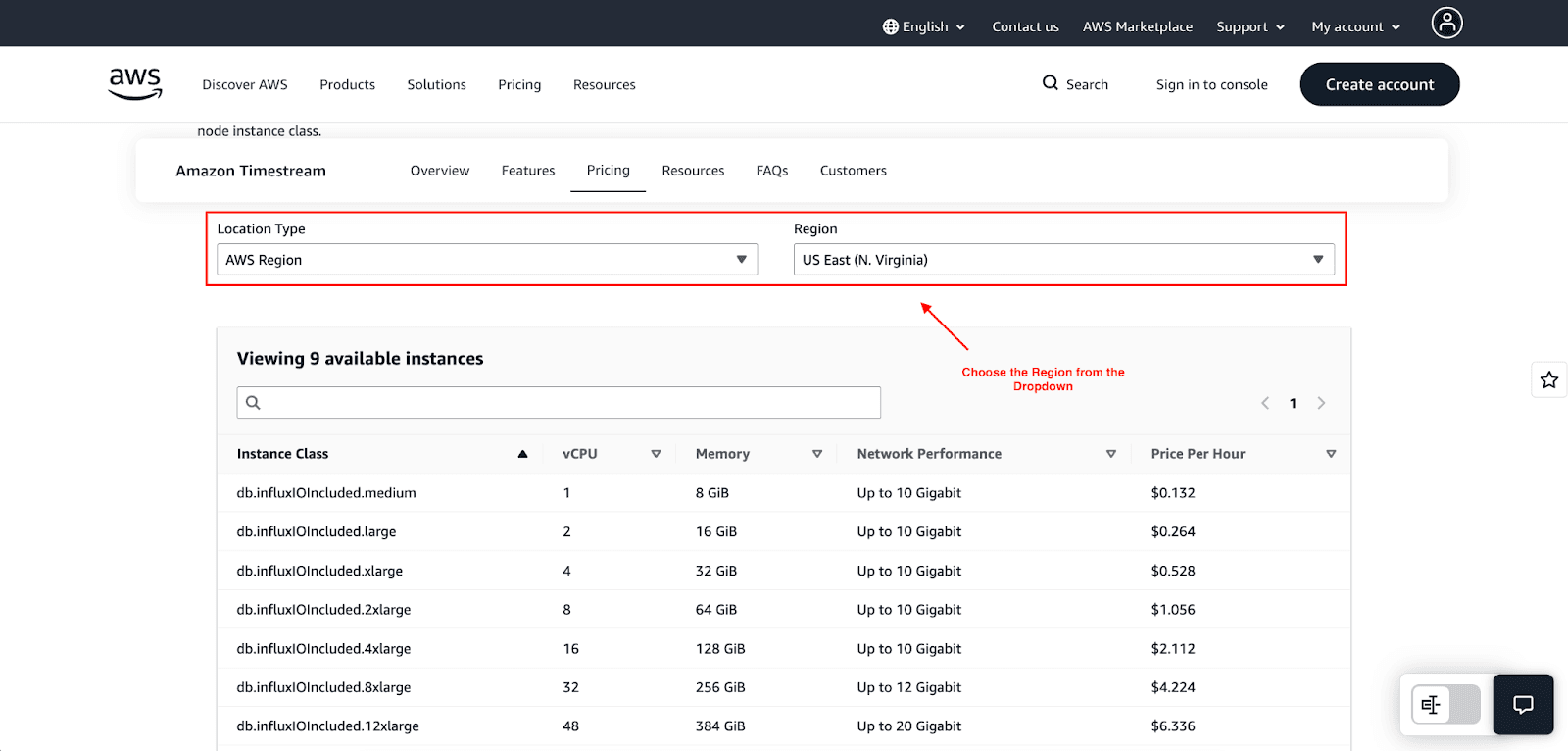
Pricing for this managed service is based on a traditional database pricing model as follows:
DB Instance Hours: Based on the selected instance class. Charged per second (minimum ~10 minutes).
Storage: Charged per GB-month for attached storage volumes.
Data Transfer: Charged as per standard AWS data transfer costs.
Optional Add-ons: Will incur charges for an additional read replica cluster.
AWS Timestream vs. Other Time-Series Databases
How does Timestream stack up against the competition in 2026?
Feature | AWS Timestream | InfluxDB (Self-Hosted) | Amazon DynamoDB |
Management | Fully Managed (Serverless) | Self-Managed / Managed | Fully Managed |
Scaling | Automatic | Manual / Complex | Automatic |
Data Tiering | Built-in (Memory -> Magnetic) | Manual Configuration | Standard / Infrequent Access |
Query Language | SQL | InfluxQL / Flux | PartiQL / NoSQL |
Best For | High-volume IoT, Observability | Complex custom setups | Key-value access patterns |
When Should You Use AWS Timestream?
Ideal Use Cases
IoT Applications: If you are developing smart cities, agriculture sensors, or manufacturing equipment, these applications will generate time series data, which will be ideal for Timestream.
DevOps Monitoring: Timestream will help consolidate logs and metrics of microservices when they are deployed in a distribution configuration.
User Analytics: Timestream will be helpful in analyzing clickstream data and will be an ideal fit for video streaming applications as users face buffering, low bitrate, and other issues.
When NOT to Use It
Static Data: If the data is static (for example, a database of product listings), it is better to use RDS or DynamoDB.
Complex Transactions: If your case involves complex ACID transactions across multiple tables, Timestream won’t suit your needs.
Pros and Cons
Pros:
No Maintenance Required: With Timestream, one enters a completely serverless territory; hence, there will be no need to manage or provision any servers.
Cost Efficiency: With built-in lifecycle management, Timestream can automatically optimize your costs.
Developer-Friendly: Timestream is easy to understand and use for those who are familiar with SQL.
Cons:
Potentially High Query Costs: Large datasets can be costly when there is inefficient and disorganized querying.
Smaller Ecosystem: Although growing, Timestream has a smaller ecosystem and community compared to other open-source solutions like InfluxDB or Prometheus.
Conclusion
In 2026, AWS Timestream has become a powerful, vital component in the modern cloud architecture. The scaling and storage management tasks are automated with AWS Timestream, so you can focus on analyzing your data, since those are the most important tasks.
When constructing an IoT platform, monitoring system, or any app that encounters high-velocity data, Timestream strikes a good balance between performance, ease of use, and cost efficiency.
Join Pump for Free
If you are an early-stage startup that wants to save on cloud costs, use this opportunity. If you are a start-up business owner who wants to cut down the cost of using the cloud, then this is your chance. Pump helps you save up to 60% in cloud costs, and the best thing about it is that it is absolutely free!
Pump provides personalized solutions that allow you to effectively manage and optimize your Azure, GCP, and AWS spending. Take complete control over your cloud expenses and ensure that you get the most from what you have invested. Who would pay more when we can save better?
Are you ready to take control of your cloud expenses?